


Alpenglow: Sunset Predictions
4.454.00 Reviews
App Specs
- Version
- 2.1
- Updated On
- License
- Free
- Downloads
- 100,000+
- Developer
- AndyDev - Andrew Yates
- Categories
- Weather
- Platform
- Android
Screenshots
 Analysis by AppCompare
I treat a sunset forecast as a reason to look up, not a promise that the sky will perform on cue. That’s the appeal of Alpenglow: Sunset Predictions: it gives sunset and sunrise fans a practical way to decide when a quick trip outside might be worthwhile. It is a weather app from AndyDev - Andrew Yates, but its particular focus makes it more useful to people who care about the quality of the light than to anyone seeking a complete replacement for a general-purpose forecast.
A repeatable routine for catching the light
The best way I’ve found to use a sky-prediction app is to make checking it part of a routine instead of opening it only when the horizon already looks promising. I’d look ahead earlier in the day, note the relevant magic hour, then check the forecast again before deciding whether to leave home. That second look matters: cloud cover and local weather can change, and a promising prediction should guide a plan rather than lock it in.
This approach suits ordinary evenings as much as photography outings. If I’m walking home, I can use the timing to choose a route with a more open view; if I’m planning to take pictures, I can decide whether to bring a camera or simply enjoy the light. The useful question is not only “Will there be a colorful sky?” but also “Can I get somewhere with a clear enough view at the right time?”
For a small outing, I’d pick a nearby spot with a dependable view and keep a backup in mind. A waterfront, open park, or hill can make a better choice than a scenic location that takes so long to reach that I risk missing the briefest light. This is a practical distinction that a forecast cannot make for you: Alpenglow can help with timing, while local familiarity helps turn that timing into a workable plan.
Settings and habits that make predictions useful
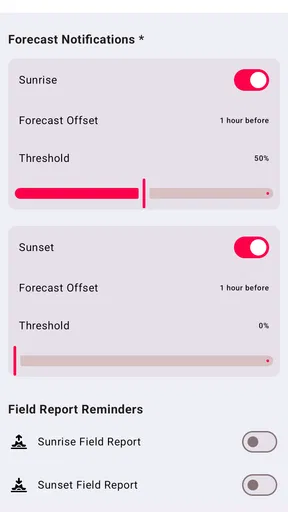
Notifications can help when sunset watching is easy to forget, but I would set them around a real habit rather than switch on every alert automatically. If I usually have free time in the evening, a reminder can prompt me to check conditions and step outside. If I’m busy at that hour most days, frequent alerts are more likely to become background noise than inspiration. The value comes from matching the reminder to a time when I could actually act on it.
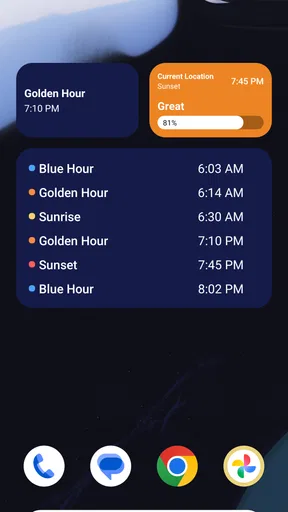
I’d also treat the displayed magic-hour timing as a planning cue, not a guarantee that the best colors will last for a fixed stretch. Arriving a little early gives me time to find a view and notice how the sky is developing. For a casual walk, I might just head out near the predicted window; for a planned photo, I’d leave room for the light to change and avoid building the whole outing around a single exact moment.
One helpful habit is to compare the prediction with what I can see around me. A forecast can be encouraging while the horizon from my street is blocked, or conditions can look better in person than I expected. The app is strongest when it informs my judgment rather than substitutes for it. That balance also keeps an imperfect forecast from ruining a pleasant evening outdoors.
Worth Reading Before You Choose

EA SPORTS FC Mobile 26 Is a Bigger Football Game, but It Takes Time

Flipboard Shows What News Apps Must Do Beyond the Feed

Switching to Android Auto Means Rethinking Your Driving Routine

Google Calendar Makes a Crowded Week Easier to Manage

Ludo King Makes the Most of the Minutes Between Plans

Baby Panda World Brings Quick Play to Modern Phones, but Its Game Library Feels Busy
The Magic of Sunset Predictions
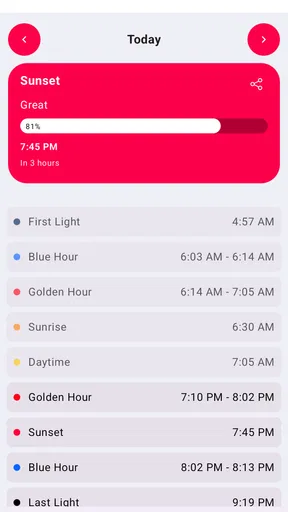
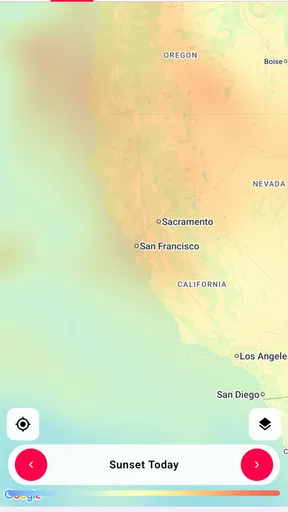
So, what’s the deal with Alpenglow? Essentially, it’s like having a personal sunset guru in your pocket. The app predicts how picturesque a sunrise or sunset is going to be, so you know whether to grab your camera or just enjoy the view. It uses a blend of weather data and algorithms to give you a heads-up on the colors and quality of the sky show in your area. How cool is that?
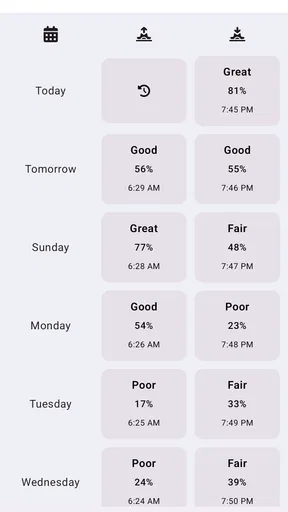
The interface is super intuitive. You’ll find a simple layout with a neat little timeline showing the peak times for sunrise and sunset. The app’s design is clean and straightforward, making it a breeze to navigate. Even if you’re not tech-savvy, you’ll get the hang of it in no time.
Features That Shine
One of my favorite features is the notification system. You can set up alerts to get notified about the day’s sunset potential. Imagine getting a ping that says, "Hey, the sky’s about to put on a show!" It’s like a little reminder to step outside and soak in some natural beauty.
Another neat aspect is the community-driven insights. Users can share their sunset photos and observations, which helps to improve the app’s predictions. It’s a nice touch that adds a social element to the experience. Plus, it’s always fun to see how sunsets look in different parts of the world.
There’s also a weather overview feature, which gives you a quick glance at the upcoming weather conditions. It’s not only useful for sunset predictions but also handy for planning your day. The app’s predictions are generally pretty accurate, though, like any weather-related app, it’s not foolproof.
- Easy-to-use interface
- Customizable notifications
- Community photo sharing
- Detailed weather insights
Faster ways to decide whether to go
For a realistic weekday example, imagine I’m finishing work and have only a short window before sunset. I’d check the prediction before committing to a longer trip, then use the weather overview as a quick reality check. If the outlook seems promising, I’d choose the closest open spot rather than attempt an ambitious drive. If it looks uncertain, I can still take a walk without treating a dramatic sky as the only successful outcome.
That small decision process is more useful than repeatedly refreshing a forecast. I can check once while planning, once closer to the time, and then let the real sky settle the question. It reduces the chance of spending the whole evening watching a screen instead of enjoying the view. For photographers, the same habit helps separate a spontaneous outing from a shoot that deserves more preparation.
Community photos offer a different kind of context from the prediction itself. I’d use them for inspiration and to see how other people experience the sky, not as proof that my own location will look identical. A photo from somewhere else can show what a colorful evening might look like, but local clouds, buildings, and sightlines still shape what I’ll actually see. That distinction keeps the social side enjoyable without turning it into a promise.
Who benefits most—and when another weather app is better
Alpenglow makes the most sense for people who regularly notice sunrise or sunset, including casual photographers, walkers, and anyone who enjoys planning a short outdoor break around changing light. Its focus gives those users a more relevant starting point than a standard weather screen, where temperature and rain are usually the first things presented. I’d also recommend it to someone who wants a gentle prompt to step away from a desk and look outside.
On the other hand, I wouldn’t rely on it as my only weather tool for a day involving travel, outdoor work, or safety-sensitive plans. A general forecast is a better choice when I need a broader picture of conditions and practical planning details. Alpenglow’s appeal is its sunset-and-sunrise angle; it doesn’t remove the need to check ordinary weather information when the consequences of getting the forecast wrong are more serious than missing a colorful sky.
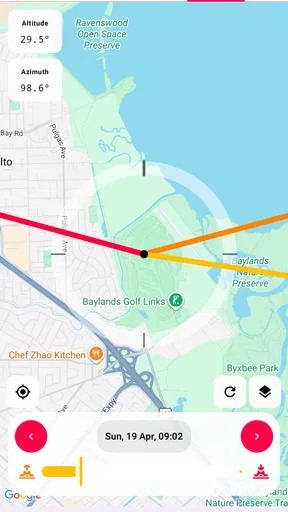
Location affects the experience in two ways. Forecast usefulness can vary with local conditions, and the view from a particular street or building may not match what the app’s timing suggests. Someone with an unobstructed horizon can make better use of a promising window than someone surrounded by tall buildings. If the horizon is blocked, I’d first find a nearby open place; if that is inconvenient, the app may not add enough to a routine weather forecast to justify regular use.
There is also a difference between wanting a prediction and wanting certainty. No forecast can guarantee a vivid display, so I’d skip this app if a disappointing sky would make an outing feel wasted. It works better when the goal is to make an informed choice and enjoy whatever the evening brings. That’s a modest expectation, but it makes the experience more satisfying.
What to expect from the app and its limits
The timeline and weather overview make the experience approachable, but ease of use should not be confused with complete local knowledge. The app can help me identify a useful time and assess the general outlook; it cannot tell me whether a nearby building will block the view from a specific corner or whether I’ll enjoy standing there. I still need to choose a sensible place and use my own eyes as conditions develop.
I also wouldn’t interpret a good prediction as a reason to plan a complicated trip without checking the rest of the weather picture. The stronger the commitment—travel time, meeting others, or carrying equipment—the more I’d want a backup plan. That might mean choosing a second viewpoint or deciding in advance that a short walk is worthwhile even if the sky stays plain. The app helps with the decision, but the flexibility comes from how I plan around it.
Alpenglow is free to download, with in-app purchases ranging from $0.99 to $29.99 per item. It has an average rating of 4.4 from around 2,900 ratings, and more than 100,000 installs. It is rated for Everyone, and version 2.1 runs on operating systems from 7.1 onward. Those details make it approachable to try, though I’d judge whether any optional purchase is worthwhile by the features I personally need rather than assuming I must pay to enjoy the basic sunset-focused experience.
The app was released on May 28, 2020, and its focused purpose remains easy to understand: help me pay attention to the light and make a better-timed choice. Its value is less about replacing every weather tool and more about adding a specific lens to the forecast. I’d keep it alongside a broader weather app if I often plan around outdoor conditions.
Why You’ll Love It
If you’re someone who loves capturing the beauty of nature or just enjoys a good sunset, this app is a great companion. It’s perfect for photographers, Instagrammers, or anyone looking to add a little magic to their daily routine. The anticipation of checking the app to see if tonight’s sunset will be spectacular adds a fun twist to your day.
Also, the app is free to download, with some premium features available if you want to dive deeper into the analytics. But honestly, the free version packs enough punch to satisfy most casual users.
A Few Thoughts
While I’m pretty smitten with Alpenglow, it’s worth noting that it’s best suited for those who have a clear view of the horizon. Urban dwellers might find it less gratifying if buildings obscure the view. Also, the prediction accuracy can vary depending on your location, but that’s just the nature of weather forecasting, right?
In conclusion, Alpenglow: Sunset Predictions is a delightful little app that adds a sprinkle of joy to your day. Whether you’re a hardcore sunset chaser or just appreciate a good sky view, it’s definitely worth checking out. So go ahead, download it, and start planning those golden hour adventures!
Pros
- Accurate sunset and sunrise forecasts.
- Customizable notifications for events.
- User-friendly interface with smooth navigation.
- Weather integration for precise predictions.
- Supports multiple locations for travel.
Cons
- Limited free features in the basic version.
- Requires internet for accurate data.
- Occasional loading delays on some devices.
- No offline mode for remote areas.
- Subscription required for premium features.
FAQs for Alpenglow: Sunset Predictions
What is Alpenglow: Sunset Predictions and how does it work?
Alpenglow is an app that predicts sunset and sunrise quality by analyzing various atmospheric conditions. It uses data such as cloud cover, humidity, and weather patterns to provide users with forecasts. This helps photographers and nature enthusiasts plan their outings to capture stunning sunset or sunrise moments.
Is Alpenglow available for both Android and iOS devices?
Yes, Alpenglow is available for download on both Android and iOS platforms. Users can easily find the app on Google Play Store for Android devices and the Apple App Store for iOS devices. This ensures that a wide range of smartphone users can access its features and benefits.
Does Alpenglow require an internet connection to function?
Alpenglow does require an internet connection to fetch the latest weather data and provide accurate predictions. However, once the data is downloaded, users can view the forecasts offline. Therefore, for the best experience and up-to-date information, a stable internet connection is recommended.
Are there any in-app purchases or premium features in Alpenglow?
Alpenglow offers both free and premium versions. The free version provides basic sunset predictions, while the premium version unlocks additional features such as extended forecasts, ad-free experience, and more detailed atmospheric data. Users can choose to purchase these extras for an enhanced experience.
How accurate are the sunset and sunrise predictions provided by Alpenglow?
The accuracy of Alpenglow’s predictions depends on the quality of the weather data it uses. While it strives to provide reliable forecasts, weather can be unpredictable, and conditions may change rapidly. Users should consider the app as a helpful guide rather than an absolute certainty.


